Personal OS: The Complete Blueprint Personal OS:完整系统架构
The full architecture of a Personal OS: three privacy layers, folder structures, loading tiers, compound mechanisms, and how to make AI a genuine thinking partner. Personal OS 的完整架构设计:三层隐私分离、文件夹结构、分层加载、复利机制,以及如何让 AI 成为真正的思考搭档。
- Three layers separated by privacy: Brain (AI-facing), Body (selective), Vault (encrypted)
- PersonalOS is ~20-40 markdown files — your self-model that AI reads every session
- Life is organized by domain, not file type — projects, writing, learning, work, family
- Compound mechanisms: Pulse synthesis, cross-domain transfer, git-powered evolution
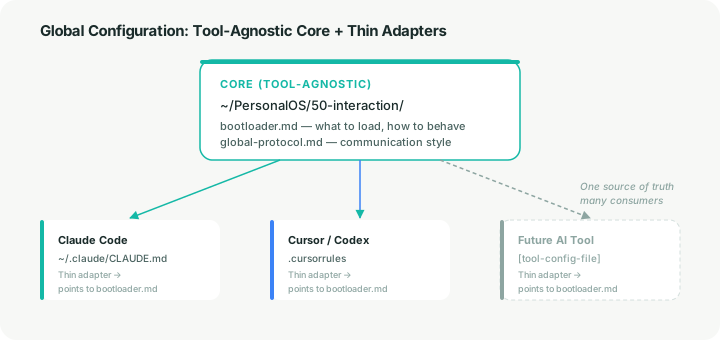
- Tool-agnostic: one bootloader, thin adapters for each AI tool
- 三层隐私分离:大脑(AI 常驻)、身体(按需访问)、私密层(加密隔离)
- PersonalOS 约 20-40 个 markdown 文件 — AI 每次会话都读取的自我模型
- Life 按生活领域组织 — 项目、写作、学习、工作、家庭
- 复利机制:Pulse 综合、跨领域迁移、基于 Git 的进化追踪
- 工具无关:一个 bootloader,每个 AI 工具一个薄适配层
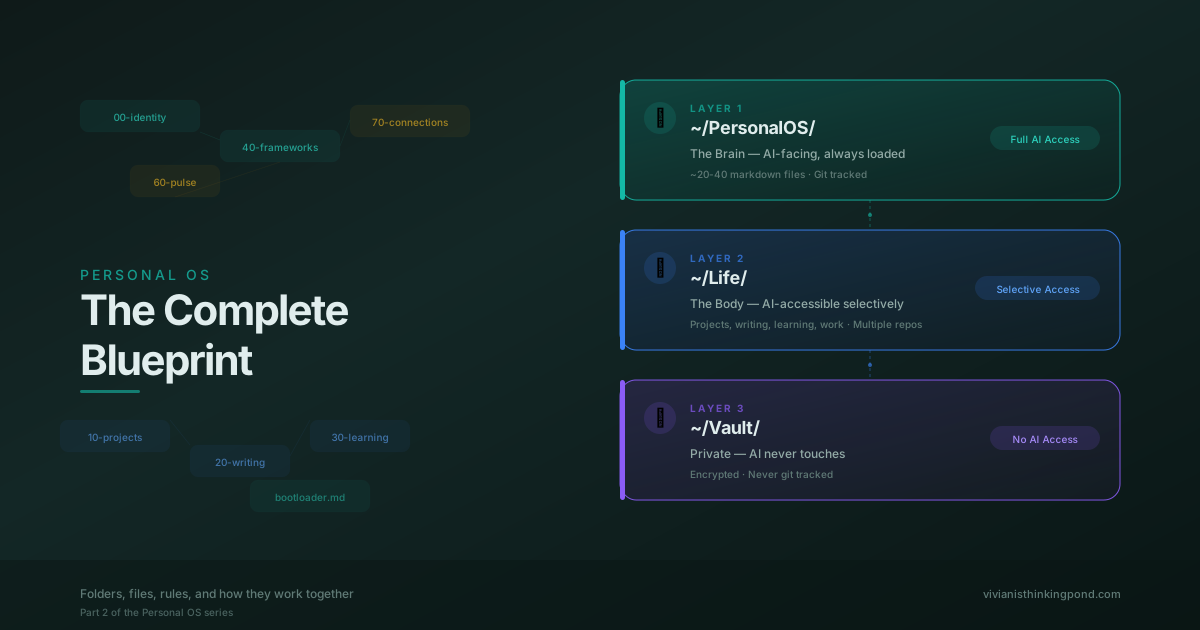
This is Part 2 of a series. Part 1 covers the philosophy behind the system. This article is the architecture itself: folders, files, rules, and how they work together.
What You’re Building
A personal operating system is a file-based infrastructure on your computer that lets AI act as a genuine thinking partner, not just a question-answering machine. It’s built on three ideas:
- Human-AI co-cognition. AI both initiates and responds. It notices patterns, suggests connections, and challenges your thinking, instead of waiting passively for prompts.
- Compound growth. Every interaction, project, and reflection feeds back into the system, making the next one better.
- Cross-domain transfer. Insights move freely between different areas of your life, powered by shared vocabulary and active synthesis.
The system is built on a Mac laptop as the primary device, with local-first data architecture and cloud as an access/sync layer.
Tool-Agnostic by Design
Everything in this architecture (markdown files, folder structures, git repositories) is independent of any specific AI tool. It works with Claude Code, Cursor, Codex, local models, or whatever comes next. Throughout this article, Claude is the reference example. Every Claude-specific mention represents a pattern you can adapt to any AI tool by writing a thin config file that points to the same underlying data.
Why You Should Own the Scaffolding
Here’s a reality worth sitting with: current AI systems have no intrinsic persistent memory. Every form of AI “memory” today (ChatGPT’s memory feature, Claude’s project knowledge, custom instructions, system prompts) is external scaffolding. Structured information gets passed into a fundamentally stateless model at the start of each session. The AI doesn’t remember you. It reads notes about you.
This system embraces that reality. Instead of delegating memory to a platform where you have limited control over what gets remembered, how it’s structured, or how it’s used, you own the scaffolding yourself.
As AI memory capabilities evolve (and they are evolving rapidly), this architecture stays valid. You end up with a portable, inspectable, version-controlled self-model that any memory system can draw from, rather than your context being locked inside one platform’s black box.
Part 1: The Three Layers
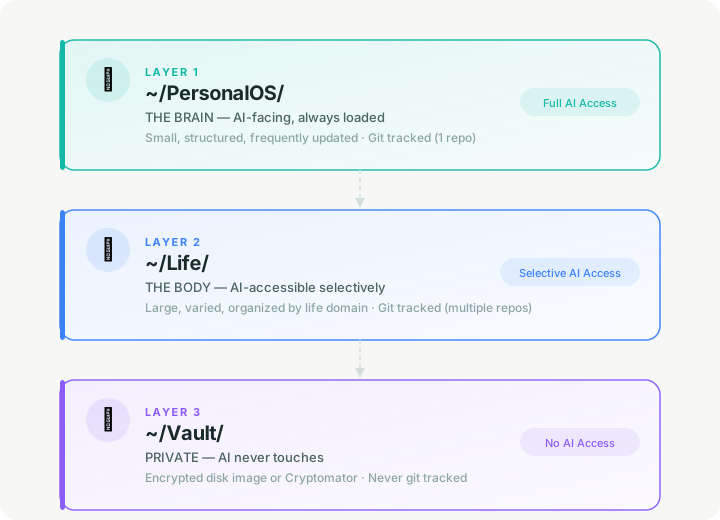
The system is organized into three layers separated by privacy and AI-access boundaries. This is the most durable architectural decision in the whole system. It maps to a permanent human need (public self / working life / secrets) and doesn’t depend on any specific AI technology.
Part 2: PersonalOS — The Brain
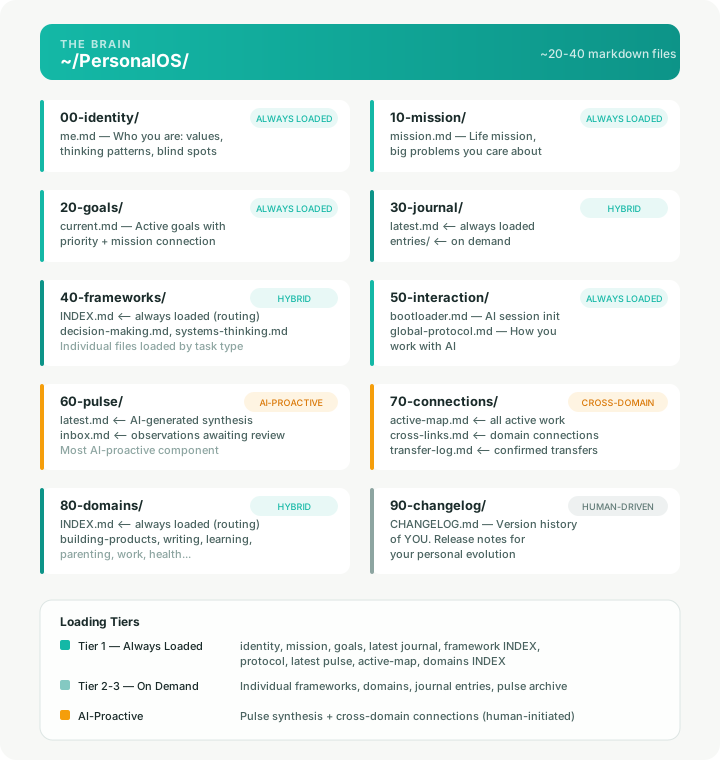
This is the AI-facing layer. It’s small (roughly 20–40 markdown files), always loaded as context, and represents your self-model. AI reads this first in every session.
What this layer is: infrastructure for human-AI co-cognition. A robust starting point that you actively construct and maintain. These folders and files don’t run themselves. They are structured scaffolding that becomes powerful when you build habits around them and when your AI tools are configured to read and act on them. The value comes from the architecture being ready, so that when you engage, everything has a place and a purpose.
How Each Component Works
None of these components are automatic. Each one is infrastructure that requires human action, AI tool configuration, or both. Here’s what each does and what activates it.
00-identity, 10-mission, 20-goals — Your foundational self-model. You write and revise these. AI reads them passively at session start for context. They change infrequently, only when you have a genuine shift in self-understanding, direction, or priorities.
30-journal — A reflective practice you maintain. You write entries; AI reads the most recent one (latest.md) for context each session. Older entries live in entries/ and are loaded on demand (during pulse synthesis or when reviewing a time period). The writing is yours; the structure just ensures AI always has your latest thinking.
40-frameworks — Your codified mental models. You create and refine these over time as your thinking evolves. INDEX.md is the key mechanism: it lists each framework with trigger conditions so AI knows when to load which framework based on the current task. AI doesn’t generate frameworks for you. It uses the ones you’ve defined.
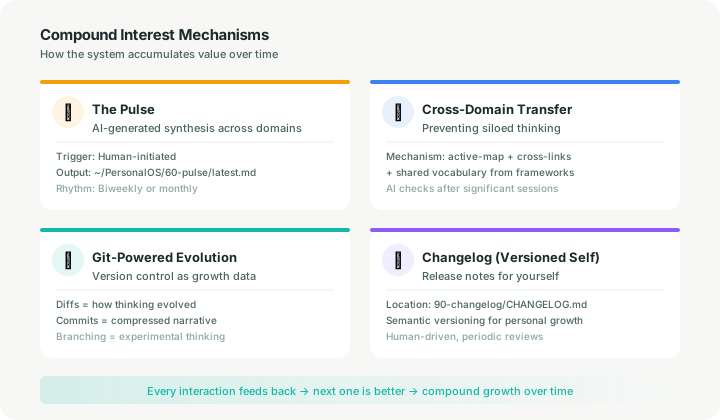
60-pulse — Periodic AI-generated synthesis across your active domains. This is the most AI-proactive component, but it is not self-triggering. You initiate a pulse by running a script or starting a conversation (e.g., “do a pulse synthesis”). AI then reads across your projects, journal, learning, and writing to surface patterns and cross-connections. Output goes to latest.md; you review and decide what to act on. A realistic rhythm is biweekly or monthly. The architecture anticipates this becoming automated via background agents, but today it requires human initiation.
70-connections — The cross-domain transfer mechanism. active-map.md is a living summary of all your active work; update it after significant sessions (the bootloader instructs AI to do this, but it depends on your AI tool following those instructions). cross-links.md captures discovered connections between domains, updated as a byproduct of pulse work or when AI notices a connection mid-session. transfer-log.md records confirmed transfers. None of this runs automatically; it depends on AI tool configuration.
90-changelog — Entirely human-driven. You write this during periodic reviews (monthly is a reasonable rhythm) or when something significant shifts. Think of it as release notes for yourself. AI can help draft entries, but you decide when a change is worth logging.
In short: this is an active construction. Infrastructure you build and maintain, not software that runs itself. The value is that the structure is ready: every insight, reflection, and connection has a defined place, so nothing gets lost and everything compounds.
Part 3: Life — The Body
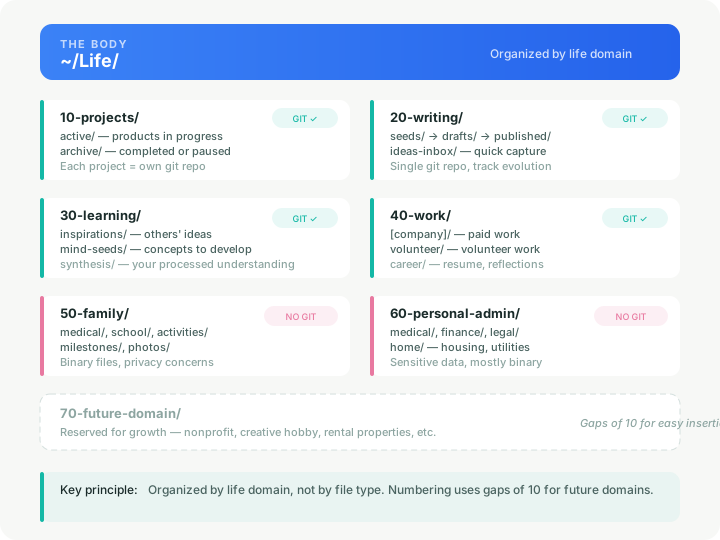
This is where actual work and life data lives. AI accesses specific folders when you choose, but never gets blanket access to everything. Organized by life domain, not by file type.
Numbering uses gaps of 10 so you can insert future domains without restructuring.
Part 4: Vault — The Private Layer
Encrypted, isolated, AI-excluded. This is for anything you would never want inside an AI context window.
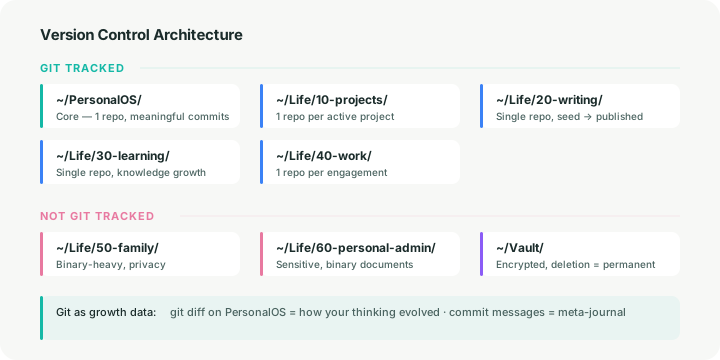
The boundary here is absolute. No AI tool, no script, no configuration should ever touch this folder. When you delete something from the Vault, it’s gone — no git history, no backup unless you made one yourself.
Part 5: Global Configuration
The bootloader makes PersonalOS available to AI across all sessions, regardless of which project directory you’re working in.
What bootloader.md Contains
# PersonalOS Bootloader — Instructions for Any AI Session

## Always Load (Tier 1)
At the start of every session, read these files to understand who I am:
- ~/PersonalOS/00-identity/me.md
- ~/PersonalOS/10-mission/mission.md
- ~/PersonalOS/20-goals/current.md
- ~/PersonalOS/30-journal/latest.md
- ~/PersonalOS/40-frameworks/INDEX.md
- ~/PersonalOS/50-interaction/global-protocol.md
- ~/PersonalOS/60-pulse/latest.md
- ~/PersonalOS/70-connections/active-map.md
- ~/PersonalOS/80-domains/INDEX.md

## After Every Significant Session
1. Update ~/PersonalOS/70-connections/active-map.md
2. Check for cross-domain connections
3. Add significant insights to ~/PersonalOS/60-pulse/inbox.md

## Co-Cognition Rules
- You are a thinking partner, not just an assistant
- Proactively surface patterns, connections, and observations
- Challenge my thinking when misaligned with mission/goals
- Never modify identity/mission/values without explicit approval
- Never access ~/Vault/ under any circumstances
Gradual Engagement
Not every AI session needs the full system. The architecture is designed to be gradually engageable: a quick coding question doesn’t require loading your identity file, and a casual conversation doesn’t need your active project map. The bootloader is for sessions where you want AI to operate as a thinking partner with full context. For lightweight tasks, work without loading PersonalOS at all. The data sits on disk, costing nothing until called upon.
Part 6: The Compound Interest Mechanisms
These mechanisms make the system accumulate value over time rather than just store data. Each one is infrastructure: it defines what should happen and where outputs go. The triggering depends on human habits and AI tool configuration, not on built-in automation.
Part 7: Version Control Architecture
Part 8: Future-Proofing
What Is Permanent (the Architecture)
- The three-layer separation (PersonalOS / Life / Vault)
- The privacy boundary model (full access / selective access / no access)
- The tiered loading pattern (always-loaded index → on-demand content)
- Human final authority on identity, mission, and values
- Local-first data with cloud as sync layer
- Tool-agnostic data layer (markdown, folders, git, no vendor lock-in)
What Will Evolve (the Implementation)
- File formats may expand beyond markdown (structured data, embeddings)
- The Pulse may become a true always-on background agent as AI capabilities mature
- The AI access boundary between PersonalOS and Life may become a smart membrane with automated rules
- Local models may replace or supplement cloud AI for privacy-sensitive operations
- The interaction protocol will deepen as AI capabilities grow
- New domains and frameworks get added as life evolves
- Manual triggering and maintenance will progressively automate
What This Architecture Is Ready For
- Migration to any AI platform (all data is in open, portable formats)
- Addition of local/private language models
- Automated agents that monitor and synthesize
- Multi-device sync (the structure works identically on any machine)
- Collaboration (specific Life folders can be shared without exposing the whole system)
- Multi-tool usage (different AI tools for different tasks, all reading the same PersonalOS)
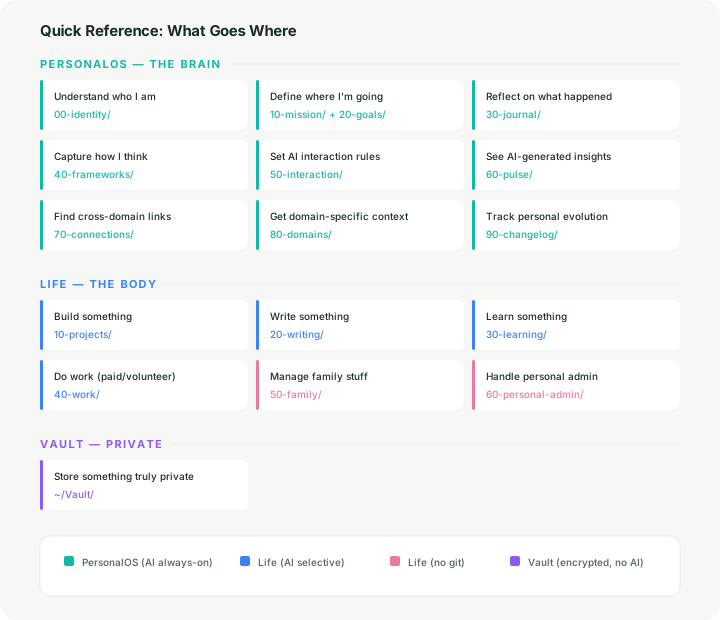
Quick Reference: What Goes Where
这是系列文章的第二篇。第一篇讲的是这套系统背后的理念和认知哲学,回答”为什么”。这篇是具体的架构设计:文件夹、文件、规则,以及它们如何协同运作。
你要搭建的是什么
Personal OS 是一套基于本地文件的基础设施,装在你自己的电脑上,让 AI 从”被动的问答工具”变成”主动的思考搭档”。它建立在三个核心想法上:
- 人机协同思考。 AI 不只是你问它才答,它会主动发现规律、提出关联、质疑你的思路。
- 复利式成长。 每一次交互、每一个项目、每一次反思都会回流到系统里,让下一次变得更好。
- 跨领域迁移。 不同生活领域之间的洞察可以自由流动,靠共享的思维框架和主动的整合机制来实现。
整套系统跑在 Mac 笔记本上,数据优先存在本地,云端只负责同步和多端访问。
不绑定任何工具
架构里的所有东西(markdown 文件、文件夹结构、git 仓库)都不依赖任何特定的 AI 工具。Claude Code、Cursor、Codex、本地模型,或者以后出现的任何新工具,都能用。本文用 Claude 作为参考示例,凡是提到 Claude 的地方,代表的是一种通用模式,换成其他工具只需要写一个薄薄的配置文件指向同一套数据。
为什么记忆要握在自己手里
有一个现实值得认真面对:当前所有 AI 系统都没有真正的持久记忆。你看到的各种 AI “记忆”功能(ChatGPT 的 Memory、Claude 的项目知识库、自定义指令、系统提示词),本质上都是外部脚手架,在每次对话开始时塞给一个无状态模型的结构化信息。AI 不是记住了你,它是在读关于你的笔记。
这套系统正是基于这个现实来设计的。与其把记忆架构交给平台(你既控制不了它记什么,也控制不了怎么组织、怎么调用),不如自己掌握这套脚手架。
AI 的记忆能力在快速进化,这毫无疑问。但这套架构不会因此过时,因为你拥有的是一个可移植、可检查、有版本控制的自我模型,任何记忆系统都可以从中读取,而不是被锁死在某个平台的黑盒里。
第一部分:三层结构
整个系统按照隐私边界和 AI 访问权限分为三层。这是整套架构中最持久的设计决策,因为它对应的是一个永恒的人类需求:公开的自我 / 工作中的自我 / 不可示人的秘密。这个分层跟具体用什么 AI 技术无关。
第二部分:PersonalOS — 大脑
这是面向 AI 的那一层。体量不大(大约 20–40 个 markdown 文件),每次会话都加载,代表的是你的自我模型。
这一层是什么: 人机协同思考的基础设施。一个你主动构建和维护的起点。这些文件夹和文件不会自己跑起来,它们是结构化的脚手架,当你围绕它们建立习惯、当 AI 工具被配置为读取和执行时,才会真正发挥作用。它的价值在于”准备就绪”:当你需要的时候,每一个洞察、每一次反思、每一个关联都有它该去的地方。
每个组件怎么运作
这些组件都不是自动运行的。每一个都需要人的动作、AI 工具的配置,或者两者兼具。
00-identity、10-mission、20-goals — 你的底层自我模型。 由你亲自撰写和修订。AI 在每次会话开始时被动读取,获得上下文。这些文件不常变,只有当你对自我认知、方向或优先级有了真正的转变时才需要更新。
30-journal — 你的反思练习。 你写日记条目,AI 每次会话读取最新的那篇(latest.md)作为上下文。旧条目放在 entries/ 里,做 Pulse 综合或回顾某个时间段时按需加载。写的内容是你的,结构只是确保 AI 始终能看到你最新的思考。
40-frameworks — 你沉淀下来的思维模型。 随着思考的演进,你会不断创建和打磨这些文件。INDEX.md 是关键机制:它列出每个框架及其触发条件,这样 AI 就知道在什么任务下加载哪个框架。AI 不会替你生成框架,它用的是你自己定义好的。
60-pulse — 跨领域的 AI 主动综合。 这是整个系统里 AI 最主动的部分,但它不会自动触发。你需要手动发起(跑一个脚本或者开一段对话,比如”做一次 Pulse 综合”)。AI 会横跨你的项目、日记、学习笔记和写作,找出规律和跨领域关联。输出写入 latest.md,你来审核并决定下一步行动。合理的节奏是两周或一个月一次。这个机制的设计预留了未来被后台 Agent 自动执行的空间,但目前需要人来启动。
70-connections — 跨领域迁移的机制。 active-map.md 是所有活跃工作的动态汇总,在重要的 AI 会话之后应该更新(bootloader 会指示 AI 这样做,但取决于你的 AI 工具是否遵循这些指令)。cross-links.md 记录 AI 发现的跨领域关联,在 Pulse 综合过程中或 AI 在会话中偶然发现关联时更新。transfer-log.md 记录已确认的真实迁移。这些都不会自动运行,依赖 AI 工具的配置。
90-changelog — 完全由人驱动。 你在定期回顾时(一个月一次是合理的节奏)或者当某些重要变化发生时撰写。可以理解为给自己写的版本更新说明。AI 可以帮你起草,但什么变化值得记录,由你说了算。
总结一下:这是一个需要主动建设的基础设施,不是装好就能自动跑的软件。它的价值在于结构已经搭好:每一个洞察、反思和关联都有明确的归属,不会丢失,而且会持续积累。
第三部分:Life — 身体
这是实际工作和生活数据的存放地。AI 在你选择的时候访问特定文件夹,但绝不会获得对所有内容的全面访问权限。按生活领域组织,而不是按文件类型。
编号之间留了 10 的间隔,方便以后插入新领域而不用重构。
第四部分:Vault — 私密层
加密、隔离、AI 绝不触碰。存放任何你绝不希望出现在 AI 上下文窗口里的东西。
这条边界是绝对的。没有任何 AI 工具、脚本或配置应该碰这个文件夹。从 Vault 里删除的东西就真的没了 — 没有 git 历史,没有备份,除非你自己做了一份。
第五部分:全局配置
Bootloader 让 PersonalOS 在所有 AI 会话中可用,不管你当前在哪个项目目录下工作。
bootloader.md 的内容
# PersonalOS Bootloader — 任何 AI 会话的通用指令

## 常驻加载(第一层)
每次会话开始时,读取这些文件来了解我:
- ~/PersonalOS/00-identity/me.md
- ~/PersonalOS/10-mission/mission.md
- ~/PersonalOS/20-goals/current.md
- ~/PersonalOS/30-journal/latest.md
- ~/PersonalOS/40-frameworks/INDEX.md
- ~/PersonalOS/50-interaction/global-protocol.md
- ~/PersonalOS/60-pulse/latest.md
- ~/PersonalOS/70-connections/active-map.md
- ~/PersonalOS/80-domains/INDEX.md

## 每次重要会话结束后
1. 更新 ~/PersonalOS/70-connections/active-map.md
2. 检查跨领域关联
3. 重要洞察添加到 ~/PersonalOS/60-pulse/inbox.md

## 协同思考规则
- 你是思考搭档,不只是助手
- 主动发现规律、关联和值得注意的事
- 当我的想法与使命/目标不一致时,提出质疑
- 未经明确同意,不得修改身份/使命/价值观文件
- 在任何情况下都不要访问 ~/Vault/
渐进式参与
不是每次 AI 会话都需要启动完整系统。架构设计为按需介入:一个简单的编程问题不需要加载你的身份文件,一段闲聊不需要你的项目地图。Bootloader 是为那些你希望 AI 作为拥有完整上下文的思考搭档来运作的会话准备的。轻量级任务可以完全不加载 PersonalOS,数据就待在磁盘上,不用的时候零消耗。
第六部分:复利机制
这些机制让系统随着时间积累价值,而不只是存储数据。每个机制都是基础设施:它定义了应该发生什么和产出放在哪里。触发方式取决于人的习惯和 AI 工具配置,不依赖内置自动化。
第七部分:版本控制架构
第八部分:面向未来
不会变的(架构层面)
- 三层分离(PersonalOS / Life / Vault)
- 隐私边界模型(完全访问 / 选择性访问 / 不可访问)
- 分层加载模式(常驻索引 → 按需内容)
- 人对身份、使命和价值观拥有最终决定权
- 本地优先,云端只做同步
- 工具无关的数据层(markdown、文件夹、git,不绑定任何厂商)
会演进的(实现层面)
- 文件格式可能扩展到 markdown 之外(结构化数据、向量嵌入)
- Pulse 可能变成真正的常驻后台 Agent
- PersonalOS 和 Life 之间的 AI 访问边界可能变成带自动规则的智能膜
- 本地模型可能替代或补充云端 AI,用于处理隐私敏感的操作
- 交互协议会随 AI 能力的增长而深化
- 新领域和新框架会随着生活的演进而添加
- 目前手动的触发和维护会逐步自动化
这套架构已经为以下场景做好了准备
- 迁移到任何 AI 平台(所有数据都是开放、可移植的格式)
- 加入本地/私有语言模型
- 自动化 Agent 的监控和综合
- 多设备同步(结构在任何机器上完全一致)
- 协作(特定的 Life 文件夹可以共享,而不暴露整个系统)
- 多工具并用(不同 AI 工具负责不同任务,全部读取同一个 PersonalOS)
速查表:什么东西放在哪里